Learn to Code Like a President
Want to learn to code the way a president does? Let me tell you, this is your lucky day.
Want to learn to code the way a president does? Let me tell you, this is your lucky day.

I’ll admit right away that there may be a bit of title in the clickbait, but there is at least some coding and some presidents in here.
If, like me, you spend a lot of time on Twitter and consume political content? 🤔 you probably saw this tweet (or is it an X?) from the president back in January:
Original post on X: view post
Honestly, I was a little surprised to see the president of Argentina tweeting a screenshot of what looked like a Jupyter Notebook or Google Colab.
For anyone who doesn’t know what I mean by notebooks, think of them like a notepad where, instead of lines, we have cells. Those cells can contain text or lines of code (Python, R, or Julia) that can be executed to do little things.
The idea of this post is to try to reach the same result as the tweet using Python and explain a bit of the process (yes, I know, I’m writing this a couple of months late, but you still have time to learn how to code and tweet like the president before the 2027 election, so you can get a head start).
Before we begin, a quick disclaimer: this post is mostly intended for people who don’t know how to code or are just getting started. Hopefully it sparks enough curiosity for them to later dig deeper into either the language or the areas I’ll cover at a high level in the following paragraphs. That said, there are other ways to get the same results, whether through an API or library that extracts data directly from YouTube, another web scraping tool, or simply a different implementation. With that out of the way, let’s start with two basic questions:
- What data do we need? At a glance, the analysis looks at each video’s number of views and likes, although we have other potentially interesting data too, such as its duration.
- Where do we get the data? The first thing we need to do is identify where the data shown in the tweet comes from. This one is easy: it refers to this year’s World Economic Forum event in Davos, or more specifically, the videos uploaded to YouTube from that event. The good news is that the featured videos, including the ones in Milei’s tweet, are all grouped in this playlist: Davos 2024: World Leaders & Special Addresses | World Economic Forum | #wef24
Now that we’ve asked those two questions, we can start writing some code. I’ll use Python as the programming language and the following libraries to extract and manipulate the data:
- re: to use regular expressions and extract useful patterns from strings (for example, likes appear as “72 K views”. I want to keep the number 72 and use it to calculate how many likes the video has, meaning 72 * 1000. I use regular expressions to extract the 72)
- json: to handle content in this format extracted directly from the YouTube page
- pandas: one of the most common Python libraries for data analysis. I’ll use it to work with dataframes (two-dimensional data structures similar to a SQL table or an Excel/Google Sheets spreadsheet), which will let me manipulate data by formatting it, changing its type, or creating new data
- selenium: a library used for web testing automation. Here, I’ll use it for a kind of web scraping (a fancy way of saying I’ll pull data from a web page, YouTube in this case) and extract that data automatically
- matplotlib: a library for generating charts
re and json are included by default when we install Python on our computer. We need to install pandas, selenium, and matplotlib ourselves. Run these commands in CMD, PowerShell, Bash, or similar:
pip install pandas
pip install selenium
pip install matplotlib
If you’re working inside a Jupyter or Google Colab notebook, add a % before pip. Once the libraries are installed, we can start writing code.
First, we import the libraries we’ll use and initialize Selenium’s webdriver (which, put simply, is the little robot that will extract the information we tell it to):
import re
import json
import pandas as pd
import matplotlib.pyplot as plt
from selenium import webdriver
from selenium.webdriver.common.by import By
from selenium.webdriver.support.ui import WebDriverWait
from selenium.webdriver.support import expected_conditions as EC


chromeOptions = webdriver.ChromeOptions()
chromeOptions.add_argument("--headless")

driver = webdriver.Chrome(options=chromeOptions)
I define two functions (blocks of code that perform a specific task) that will help me handle data that comes in “dirty” or in a format that doesn’t match what we need:
def extract_duration(json_data):
    duration_iso = json_data["duration"]
    duration_seconds = 0

    if duration_iso.startswith("PT"):
        duration_iso = duration_iso[2:]
        hours_index = duration_iso.find("H")
        minutes_index = duration_iso.find("M")
        seconds_index = duration_iso.find("S")

        if hours_index != -1:
            duration_seconds += int(duration_iso[:hours_index]) * 3600
            duration_iso = duration_iso[hours_index + 1 :]

        if minutes_index != -1:
            duration_seconds += int(duration_iso[:minutes_index]) * 60
            duration_iso = duration_iso[minutes_index + 1 :]

        if seconds_index != -1:
            duration_seconds += int(duration_iso[:seconds_index])
    return duration_seconds

def convert_likes(likes_str):
    likes_str = likes_str.upper()
    if " K" in likes_str:
        like_count = float((likes_str).split(" K")[0]) * 1000
    else:
        like_count = float(likes_str)
    return like_count
I asked ChatGPT for the first function and didn’t iterate on it at all, so there’s probably a better way to solve the compatibility problem.
Now we can define the path the webdriver will follow, using the playlist URL as our starting point.
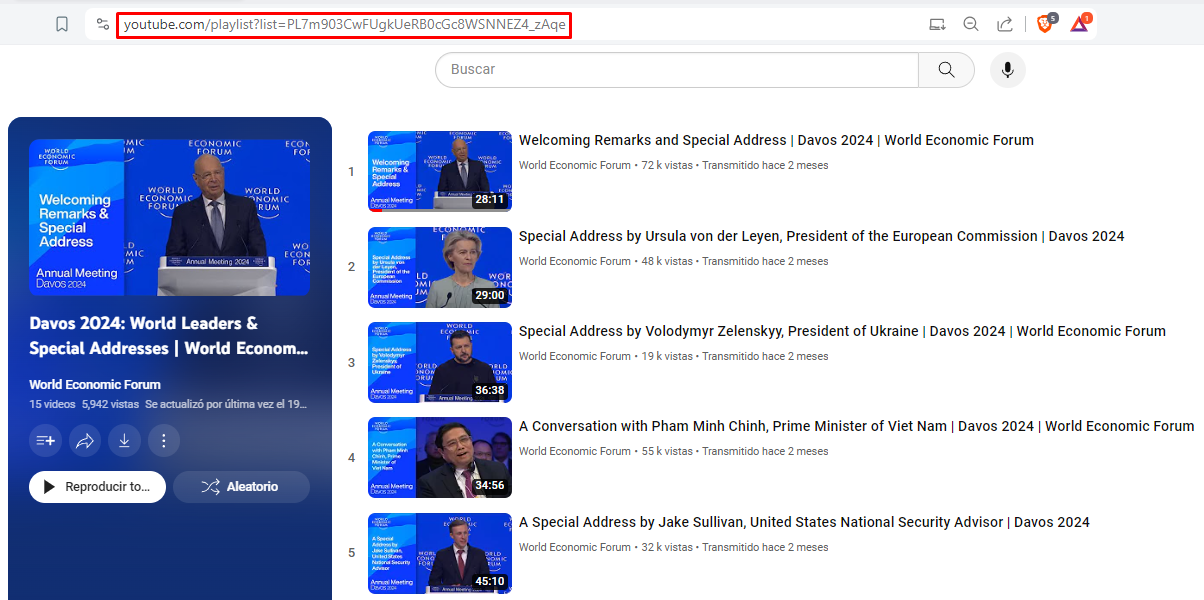
PLAYLIST_URL = (
    "https://www.youtube.com/playlist?list=PL7m903CwFUgkUeRB0cGc8WSNNEZ4_zAqe"
)

driver.get(PLAYLIST_URL)

"""
Con las siguientes líneas de código, lo que hacemos es buscar mediante xpath
todos los elementos que coincidan con id="video-title", y de los mismos extraemos
el título del video y el link al mismo.
Estos datos los almacenamos en una lista de diccionarios (estructura de datos de tipo clave-valor).
"""
videos_elements = driver.find_elements("xpath", '//*[@id="video-title"]')
videos_tuple = [
    (e.get_attribute("title"), e.get_attribute("href")) for e in videos_elements
]
videos = [
    {"title": e.get_attribute("title"), "link": e.get_attribute("href")}
    for e in videos_elements
]
You can think of XPath as a language that lets us search within a web page’s HTML. The following screenshot shows a simple way of getting the XPath for an element on a page.
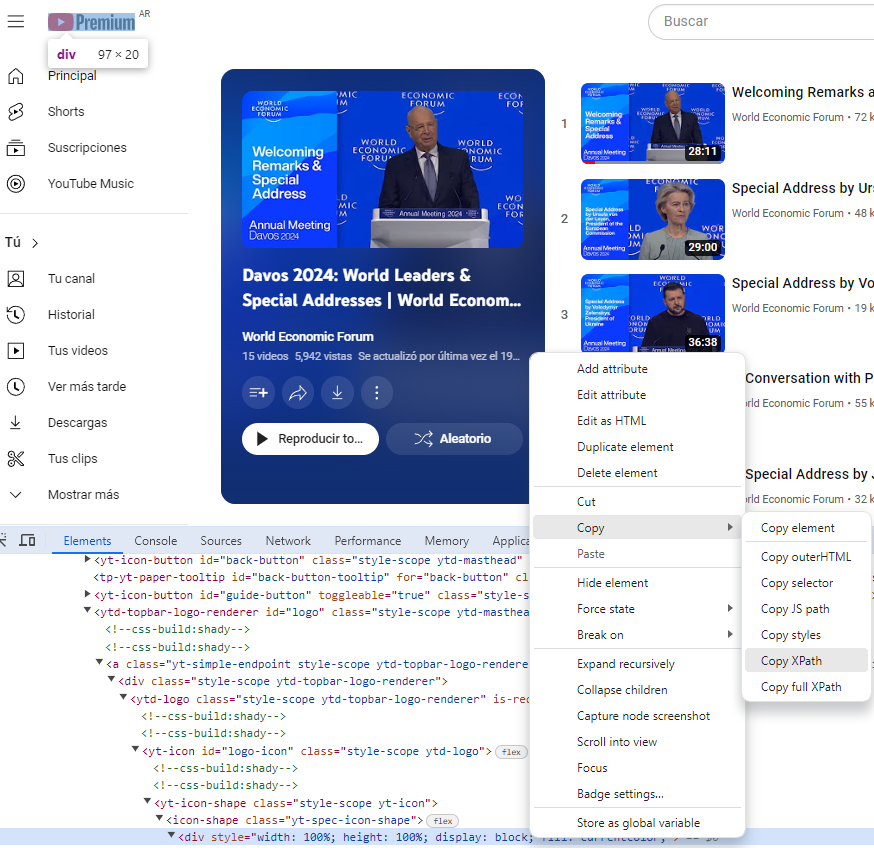
If you’d like to go deeper into web scraping or this kind of automation, I recommend looking up more information on the subject.
Next, we’ll go through this list, open each video through its link, and extract its views and likes:
df_rows = []
for v in videos:
    driver.get(v.get("link"))
    WebDriverWait(driver, 15).until(
        EC.presence_of_element_located((By.XPATH, '//*[@id="video-title"]'))
    )
    like_button = driver.find_element(
        "xpath",
        '//*[@id="top-level-buttons-computed"]/segmented-like-dislike-button-view-model/yt-smartimation/div/div/like-button-view-model/toggle-button-view-model/button-view-model/button/div[2]',
    )
    views = driver.find_element("xpath", '//*[@id="info"]/span[1]')

    script_element = driver.find_element(
        "xpath", '(//script[@type="application/ld+json"])[2]'
    )
    script_text = script_element.get_attribute("textContent")
    data = json.loads(script_text)

    resource_id = re.search(r"v=([^\&]+)", v.get("link")).group(1)
    like_count = convert_likes(like_button.text)
    duration = extract_duration(data)
    view_count = float(data["interactionCount"])
    video_title = v.get("title")
    df_rows.append([resource_id, view_count, like_count, duration, video_title])

driver.quit()
Once the information is stored in a list of lists, we put it into a Pandas dataframe:
df_youtube_statistics = pd.DataFrame(
    data=df_rows,
    columns=["resource_id", "view_count", "like_count", "duration", "title"]
)
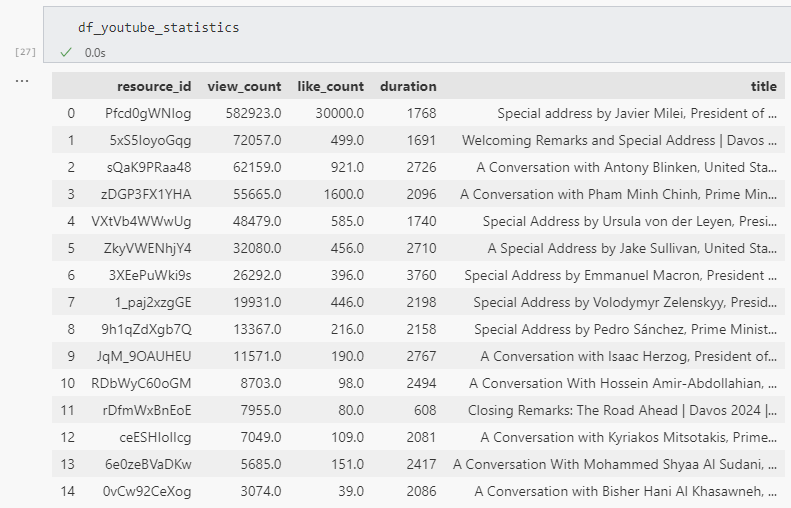
Finally, we sort it by number of views, just like the president:
df_youtube_statistics.sort_values(
    by="view_count", ascending=False, ignore_index=True, inplace=True
)
This gives us the data in the following form:
Now that we’re getting the hang of it, we can improve (?) the analysis and add a calculated column, such as the like ratio:
df_youtube_statistics["likes_ratio"] = round((df_youtube_statistics["like_count"] / df_youtube_statistics["view_count"]) * 100, 2)
df_youtube_statistics["title"] = df_youtube_statistics["title"].apply(lambda x: x.split("|")[0])
df_youtube_statistics.sort_values(by="likes_ratio", ascending=False, inplace=True)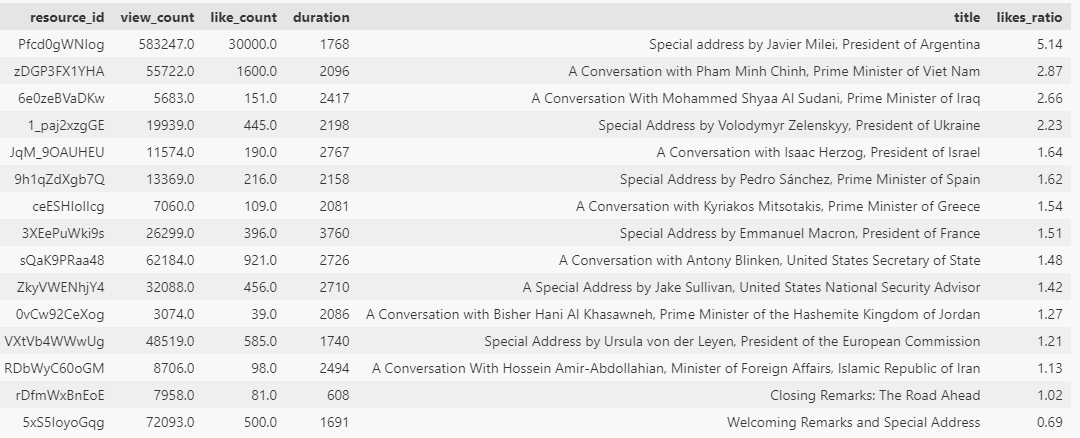
We can even add a few charts to make the results easier to read:
df_youtube_sorted_by_views = df_youtube_statistics.sort_values(by='view_count', ascending=False)
df_youtube_sorted_by_likes = df_youtube_statistics.sort_values(by='like_count', ascending=False)
df_youtube_sorted_by_ratio = df_youtube_statistics.sort_values(by='likes_ratio', ascending=False)

fig, axs = plt.subplots(1, 3, figsize=(18, 5))  # 1 fila, 3 columnas

df_youtube_sorted_by_views.plot.bar(x="title", y="view_count", ax=axs[0], color='skyblue')
axs[0].set_title('View Count')

df_youtube_sorted_by_likes.plot.bar(x="title", y="like_count", ax=axs[1], color='lightgreen')
axs[1].set_title('Like Count')

df_youtube_sorted_by_ratio.plot.bar(x="title", y="likes_ratio", ax=axs[2], color='orange')
axs[2].set_title('Like Ratio')

plt.tight_layout()

plt.savefig('youtube_statistics.png')

plt.show()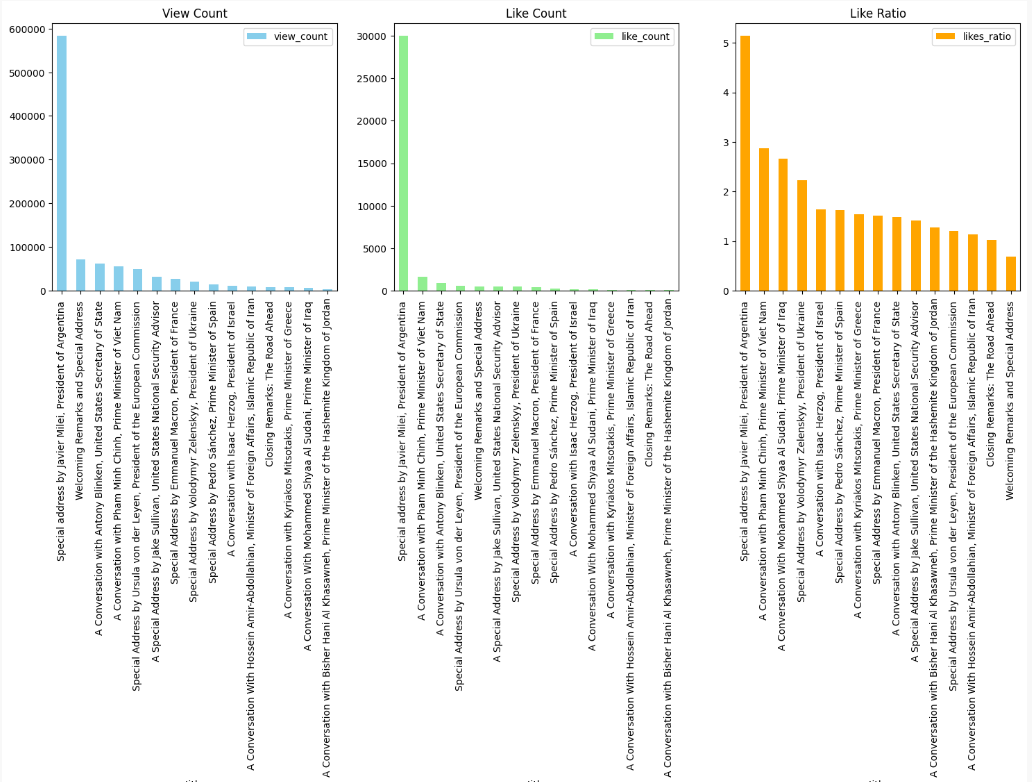
Looking at the charts, we can conclude that the online streets belong to Argentina, papá.

Now, seriously, I hope this post worked as a sort of “guide” to experimenting with Python and, in the best-case scenario, sparked some curiosity to keep learning and digging deeper into the tools we covered. The code is in a GitHub repository, so you can download it and try it yourself:
Related resource on GitHub: akalautaro/datos-con-python
On my GitHub profile, you can find repositories with personal projects and, mainly, a few data engineering challenges:
Related resource on GitHub: akalautaro
Hope you feel like building some stuff with Python 🤠
Translated from the article originally published on DEV Community.