Implementing Databricks Asset Bundles Without Dying in the Process
What I learned implementing Databricks Asset Bundles in a production project.

In this article
Table of contents
- Introduction
- What are Databricks Asset Bundles?
- Before DABs: is it really that chaotic?
- During: implementing DABs in a production project
- After DABs: this is what paradise looks like
- Tips & tricks?
- Conclusion
A quick disclaimer: this was my first experience working with Databricks. More than one thing could probably be done better and there may be better practices out there. What I’m writing about here is my own experience.
Introduction
A few months ago, I started working with Databricks on a “small” project for a large company (consulting firms ftw, I guess?). The little project was nothing serious: ingest data from Excel files (to nobody’s surprise), call an API, run a couple of transformations, and write the data into a Delta table. Pretty straightforward, so we solved it with a couple of notebooks orchestrated by a Databricks Workflow and got it running. So far, so simple. The “problem” (or challenge) came when we had to heavily customize what had originally been a two-notebook pipeline so that users in other countries could use the tool we had built. We went from one country to six, adding validations, new business rules, differences between environments and APIs for each country, new features such as custom notifications sent directly to users, result exports, new data flows, and a long list of other things.
By then, the workflow was no longer a single workflow with two notebooks for one country. We now had something a little more complex, with parameters, data validations, status-based notifications, and new workflows as well. The requirements were covered and we had something functional, but now we had new problems: several people on the team were changing the workflows, with little or no traceability of changes to the pipelines.
Luckily, technology usually gives us solutions to common problems like this. So, late but not too late, we implemented Databricks Asset Bundles in our project.
What are Databricks Asset Bundles?
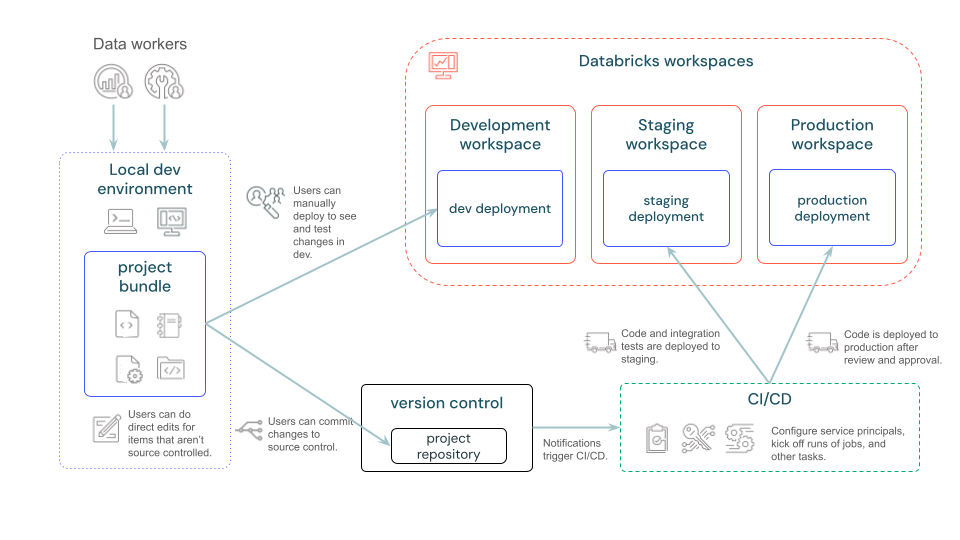
Databricks Asset Bundles (DABs) are a tool designed to make it easier to adopt software engineering best practices (code versioning, testing, CI/CD, deployment across environments, among others) in data science and AI projects, making collaboration easier while projects are under development. According to Databricks: “A bundle is an end-to-end definition of a project, including how the project should be structured, tested, and deployed.” Broadly speaking, DABs let us define any Databricks resource in .yaml files inside our repository, following an infrastructure-as-code (IaC) approach.
Before DABs: is it really that chaotic?
Although the documentation says Asset Bundles are intended for complex projects (who knows what complex means in this context), in our case they became necessary even without a particularly large project, once the number of workflows and people working on them stopped being one.
Our main problem without Asset Bundles was that we couldn’t handle workflow versioning. The UI is pretty friendly for developing new workflows, but there’s no way to see which changes were made or keep a record of them. That increases the chance of discrepancies between pipelines, leaves no room for code reviews, and makes it impossible to get a general overview without going through the details task by task, among other things.
It may not sound like much, but not having versioning for our workflows was reason enough to move forward with DABs, even though I didn’t have much experience with Databricks, IaC, or CI/CD either (lots of trial and error).
Our workflow before DABs, mainly for workflows:
- Code development tracked in a repository.
- Workflow changes made in the UI, applying them one by one through the interface. If you have similar workflows, you have to open each one in the UI and change them one by one, even task by task.
During: implementing DABs in a production project
We didn’t need cluster deployment or anything too unusual. All we needed, once again, was workflow versioning, plus continuous validation and deployment.
I have to say that the official Databricks documentation on implementing DABs is pretty clear, although there were several things it didn’t mention explicitly that I spent a few hours fighting with before I got everything working.
First things first
The Databricks CLI must be installed and configured. You can easily check it with:
databricks --versionOnce that’s ready, it’s as easy as running:
databricks bundle initThen follow the interactive prompts, which are basically just naming the bundle and choosing a template. The bundle structure will look like this:
README.md databricks.yml fixtures pytest.ini requirements-dev.txt resources scratch setup.py src testsAnd databricks.yml will look something like this:
bundle:
  name: dabs101

include:
  - resources/*.yaml

targets:
  dev:
    # The default target uses 'mode: development' to create a development copy.
    # - Deployed resources get prefixed with '[dev my_user_name]'
    # - Any job schedules and triggers are paused by default.
    # See also https://docs.databricks.com/dev-tools/bundles/deployment-modes.html.
    mode: development
    default: true
    workspace:
      host: https://<development-workspace-url>

  prod:
    mode: production
    workspace:
      host: https://<production-workspace-url>
    permissions:
      - user_name: user1@mail.com
        level: CAN_MANAGE
    run_as:
      user_name: user2@mail.com
There are a couple of variables worth highlighting in this short YAML:
- target: different environments. We can define more than one environment and use different parameters for each. This is useful for deploying to dev or QA and running tests before deploying to prod (let whoever is without sin cast the first stone).
- include: the path to the resources included in the bundle.
For all available configuration options, see Databricks Asset Bundle configuration.
Now for the important part: what does a workflow structure look like in YAML?
resources:
  jobs:
    foo_job:
      name: foo_job
      max_concurrent_runs: 1
      schedule:
        quartz_cron_expression: 12 0 0 * * ?
        timezone_id: America/Mexico_City
        pause_status: UNPAUSED
      tasks:
        - task_key: foo_task
          notebook_task:
            notebook_path: the/notebook/path
            source: GIT
          existing_cluster_id: existing_cluster_id
      git_source:
        git_url: git_url
        git_provider: git_provider
        git_branch: git_branch
      queue:
        enabled: true
      parameters:
        - name: parameter1
          default: value1
        - name: parameter2
          default: value2
        - name: parameter3
          default: ""
A little trick: even though YAML is easy to read and understand, writing it is a bit of a drag for me. Luckily, you can build workflows through the Databricks UI and then export their source as YAML, JSON, or Python code.
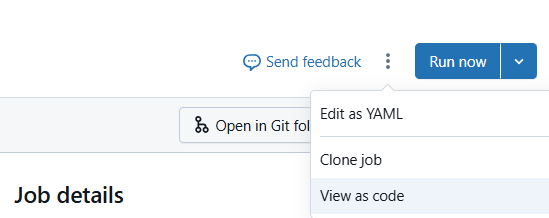
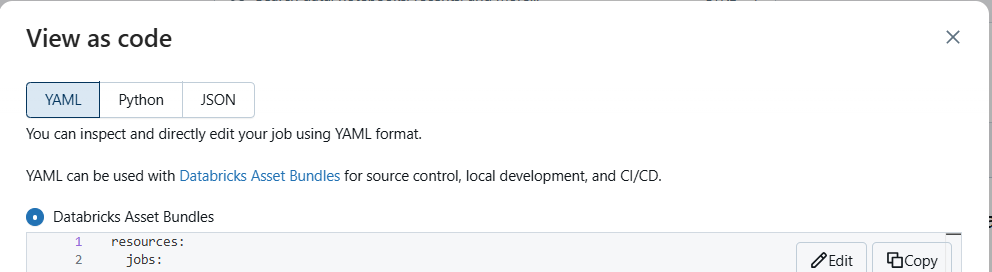
For the interesting part, which is deploying the bundle, the Databricks CLI has three pretty neat commands:
databricks bundle validate --target prod  # validate the bundle and identify errors and warnings
databricks bundle summary --target prod   # summarize what will be deployed (new and/or linked to existing resources)
databricks bundle deploy --target prod    # deploy the bundle
So far, so good for deploying new resources. But in our case, the workflows already existed, since they had been developed through the Databricks UI. Deploying them created the workflows again, leaving us with duplicate jobs.
I fought quite a bit with commands, metadata files, YAML entries, and several hours of work. In the end, the magic came from the bind command:
databricks bundle deployment unbind --target prod workflow_unique_name   # required if the resource is already linked to a new id in the bundle
databricks bundle deployment bind --target prod workflow_unique_name workflow_id
With bind, we tell Databricks that the existing resource with ID X will now be managed by Asset Bundles: magic. One important detail is to pay attention to the --target flag. If you don’t specify it, the default is used, and you may end up like me, wondering why the workflow keeps getting duplicated in prod when you bound it to dev.
After DABs: this is what paradise looks like
Well, let’s not get carried away. As I said earlier, our main problem is no longer a problem: our workflows are now versioned.

It’s worth pointing out that workflows were my one and only motivation, but DABs can manage many more Databricks resources: workflows, Delta Live Tables pipelines, cluster creation and deployment, and so on. I used the concern as an excuse to test the tool for the first time, although I’ll probably keep digging deeper from here.
Tips & tricks?
While trying to implement DABs, I ran into several issues. Here’s a summary so you can hopefully save a little more time than I did:
databricks bundle generate: in theory, this command generates the.yamlfor an existing resource. In my case, the workflows pointed to notebooks connected to an Azure DevOps repository, so their paths were relative to the repository. Because of this, the command returned path errors or invalid path format errors. My solution, as mentioned above, was to create the.yamlfiles by exporting the code from each workflow. A little more manual, but just as valid.- Duplicate jobs: I tried linking existing resources in different ways using names, IDs, paths, and so on. If your jobs are duplicated, it means they aren’t correctly linked to the bundle. There are two options: keep the new bundle-managed job and delete the old one (losing its run history), or manually bind the resources to the bundle.
databricks bundle deployment bind/unbind: pay close attention to which target you’re using. My default target was dev, so running bind kept duplicating jobs. Keep an eye on the--targetflag. Also, if you already deployed the bundle and the resources aren’t correctly linked, you’ll need to unbind each resource.- Make use of CI/CD pipelines: bundle deployment is idempotent. Every deployment compares the hashes of the deployed resources with those in the bundle. If nothing changed, the resource isn’t deployed again. This means you can include bundle validation and deployment in the repository’s CI/CD pipeline without worrying about unnecessarily overwriting anything.
- Once workflows are managed by bundles, editing them in the UI is blocked. This reinforces IaC and prevents manual overwrites. It can be a real drag during a phase of constant changes, when iterating through the UI would be easier than changing YAML files. You can always remove the resource from the bundle, edit it in the UI, and add it back later, although that would go against the whole reason for implementing DABs. Still, the option is there.
Conclusion
To wrap up, here are a few final questions and answers that came up during the process:
- Would I implement DABs in other projects? Definitely yes. Managing the entire deployment from a single file (or a set of YAML files) is a huge plus, especially when everything can be versioned and tracked in a repository.
- Would I implement them in a project from day one? Yes and no. The biggest drag is the UI blocker for workflows I mentioned earlier. I think DABs can be implemented from the start, but resources that need a lot of iteration, such as a workflow or pipeline in the early stages of development, could be added at the end or once they’re mature enough that they no longer require constant changes to YAML files.
- Bundle communication isn’t bidirectional: changing something in the UI doesn’t automatically update the bundle. This matters because if we change resources through the UI and don’t reflect those changes in the bundle definition, the next deployment will overwrite the configuration with whatever is defined there. There should be a way to build a pipeline that checks for these resource state changes, although I don’t know how.
–
To close, I’ll repeat that this was my first time working with Databricks and Databricks Asset Bundles, so I’m sure many things could be done better. The idea isn’t for this to be taken as a guide per se, but for my experience to serve as a reference for people who may be in the same place I was a few days ago, with no clue how to implement the tool.
Some useful links
What are Databricks Asset Bundles? Databricks Asset Bundle configuration bundle command group Databricks Asset Bundles feature release notes Best practices and recommended CI/CD workflows on Databricks
Translated from the article originally published on DEV Community.